How to choose a payment orchestration platform: a simple guide for online stores
What does a payment orchestration platform do?
To take a payment online, you go through a payment provider, often called a PSP. That's the company that collects the money from your customer and pays it out to you, like Stripe, PayPal or Mercado Pago.
If you sell in one country, one PSP is usually enough. Things get harder when you add a country, a new way to pay, or when your PSP has an outage and your sales stop.
A payment orchestration platform works like a switchboard for your payments. Your store connects to it once. The platform then talks to several PSPs and picks which one handles each payment.
For a clear picture of who does what, read PSP, gateway, aggregator, orchestrator: what's the difference?.
Before you choose a payment orchestration platform, look at how your customers pay
Before you talk to any platform, pull up your last three months of sales. Write down three things: the countries you sell in, the currencies, and the payment methods your customers use.
In Mexico, for example, many shoppers pay by SPEI bank transfer or with cash at an OXXO convenience store. In Brazil, Pix is everywhere. That list becomes your shopping list, and the right platform checks every box on it.
Make sure every payment method is already live
In the sales demo, you'll see a lot of PSP logos. For each one, ask if it's live today, in your country, both for collecting payments and for sending payouts.
Ask two more simple questions. Who signs the contract with each PSP, you or the platform? And if you want to add a PSP the platform already works with, how long does it take? A good answer sounds like a few days of setup, with no technical work on your end.
Ask how the routing works
Routing is the set of rules that decides which PSP gets which payment. For example: Mexican cards go to PSP A, and OXXO payments go to PSP B.
Ask who can change those rules and how. Some platforms let your own team do it from a simple screen, and some let you try a new rule on a small share of your sales before you roll it out to everyone.
Ask if the platform retries a declined payment with another PSP. That helps when the decline comes from a short-lived problem, like a bank that's briefly unavailable. Card networks also limit how often a declined card can be tried again (Visa's rules on declined transactions), so ask when the platform retries and how it makes sure a customer is charged only once.
Ask for numbers you can trust
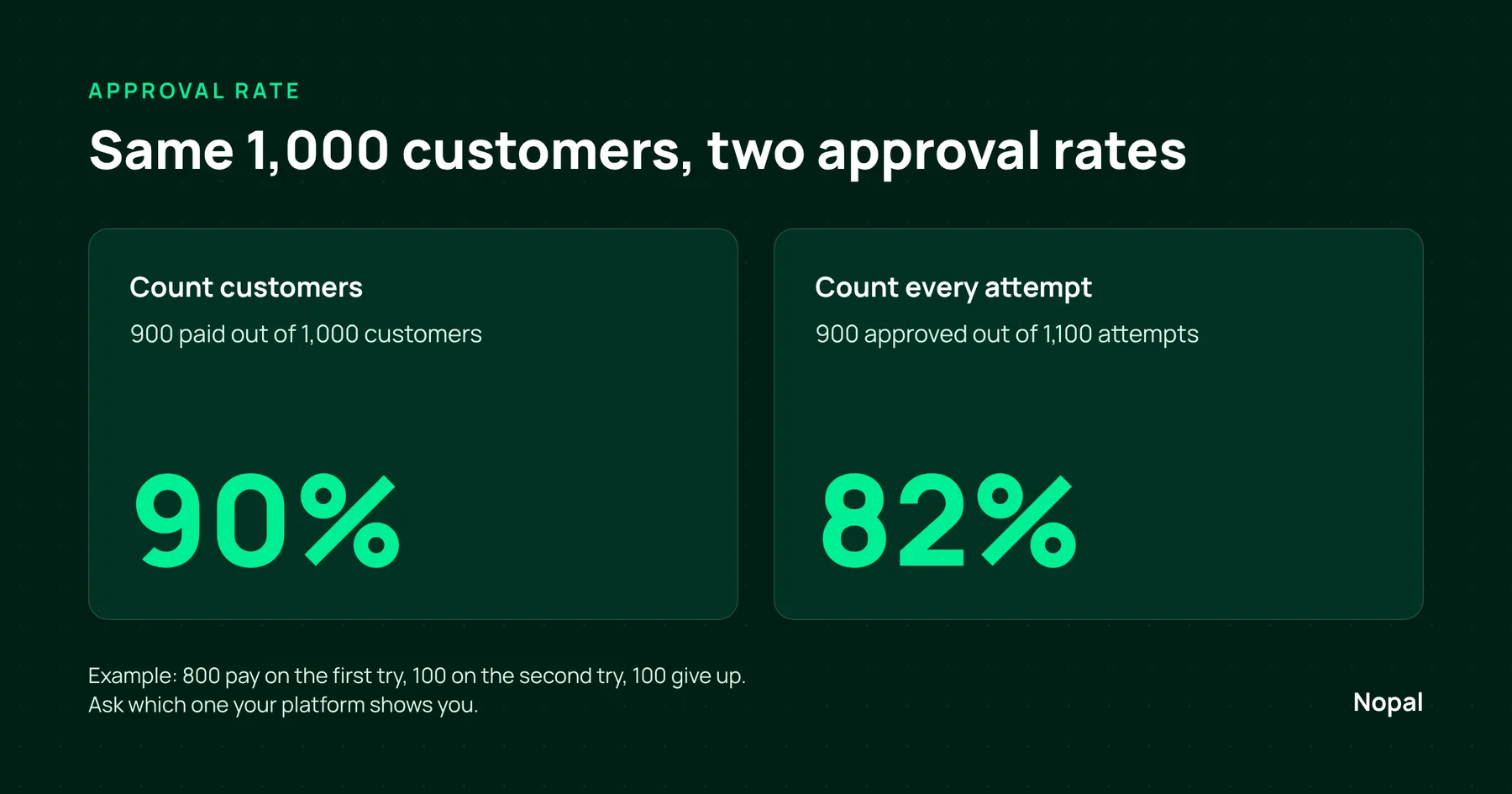
The number you'll watch most is your approval rate: the share of payments that go through. The catch is that there are several ways to calculate it.
Here's an example. 1,000 customers try to pay. 800 pay on the first try, 100 pay on the second try, and 100 give up. Count customers, and your approval rate is 90%. Count every attempt, and it drops to about 82%. Both numbers are "true," and they answer different questions. The 90% tells you how many customers ended up paying. The 82% tells you how well your payments perform: approved payments divided by every payment that got a final answer, approved or declined. Use that one to compare PSPs, and ask which one the platform shows you. How to calculate payment approval rate correctly explains the most reliable method.
Also ask for decline reasons in one clear list that's the same for every PSP (see Why a declined payment rarely tells you why). And for payments that sit in pending, like an OXXO voucher the customer hasn't paid yet, find out how long it takes before they're canceled. Pending payments in LATAM: why they pile up and when they should expire lists the timing for each payment method.
Ask who keeps your customers' saved cards
When a customer saves a card on your site, the card is stored in a secure vault and replaced with a code called a token (the PCI Security Standards Council sets the security rules for this). That token is what lets your customer check out in one click next time.
If you ever switch platforms, you'll want to take those tokens with you. Otherwise, every customer has to type in their card again. Ask who keeps the tokens, and whether the contract lets you move them to another certified provider, with a timeline and a price agreed up front.
Work out the real cost with your own sales
A platform's price usually mixes several things: a fee per payment or a percentage, a monthly minimum, and setup fees. The PSP's own fees usually come on top.
Ask if you also pay for declined payments and second attempts. Ask what happens if you fall below the minimum. Then run the math on your real sales from the last three months. It's the only fair way to compare two offers.
Plan for the day a provider goes down
Sooner or later, a PSP will have an outage. On that day, you'll want to know who to call, in what language, and during which hours. You'll also want to know how fast your payments can move to another PSP.
Last, read the terms for leaving the platform: the notice period, and how you get your sales history back.
Payment orchestration platforms in Latin America
These are the names that come up most often when you look for a way to sell in Latin America. Each one has its own approach, and the questions below help you compare them on the same terms.
- Yuno: a payment orchestration platform born in Latin America.
- dLocal: a payment provider focused on local payment methods in emerging markets.
- Spreedly: known for its card vault and its many connections to payment providers.
- Primer: a payment orchestration platform built around no-code payment workflows.
- Gr4vy: a cloud-based payment orchestration platform.
- Nopal: a payment orchestration platform that connects online merchants to the right local PSPs through a single integration.
Questions to ask before you choose a payment orchestration platform
- Are all the countries and payment methods you need live today?
- Who can change the routing rules, and how?
- Does the platform retry declined payments, and how does it make sure customers are charged only once?
- How is the approval rate calculated?
- Are decline reasons clear and the same for every PSP?
- Who keeps your customers' saved cards, and can you take them with you if you leave?
- What does it cost on your real sales from the last three months?
- Who do you call during an outage?
Frequently asked questions
- I only use one PSP. Do I need a payment orchestration platform?
- Not right away. It becomes useful when you add a country, a local payment method, or want a backup plan in case your PSP has an outage.
- Does a payment orchestration platform replace my PSP?
- Usually it works alongside it. The PSP collects the money and pays it out to you. The platform connects you to several PSPs and picks which one to use for each payment.
- Will it really get more of my payments approved?
- It can help, by sending each payment to the PSP most likely to accept it. To check, measure your approval rate before and after, using the same method both times.
- What should I check first in the contract?
- Who keeps your customers' saved cards and whether you can take them with you, the monthly minimum, what you pay for declined payments, and the terms for leaving.