Why a declined payment rarely tells you why
A declined payment rarely tells you why because every PSP reports declines in its own format, and because "declined" usually covers three different problems: bank refusals, bad customer data and technical errors. Map every raw response to one short list of reasons, keep the raw message next to it, and you will know which problem you are solving.
Why does every PSP report decline reasons differently?
You open your dashboard, find a declined payment, and the reason says "Do not honor". Or "Error 05". Or a sentence in Portuguese. Or nothing at all.
One provider returns numeric codes. Another returns free text. A third passes on the issuer's raw message, in the language of the country where the bank sits. "Insufficient funds", "Fondos insuficientes" and "Saldo insuficiente" can all describe the same refusal.
Each PSP maps issuer responses, its own risk decisions and its own technical errors into its own format. With one PSP, your team learns the vocabulary. With several, the top decline reasons report turns into hundreds of strings nobody can act on.
What is actually behind a declined payment?
When we review decline lists, almost everything falls into one of three groups:
- Bank declines. Insufficient funds, issuer refusal, limit reached, suspected fraud. The issuer or the provider's risk engine looked at the payment and said no.
- Data problems. The request was bad. Nobody refused the payment.
- Technical errors. A timeout, an unavailable provider, a configuration issue in the integration. Nobody refused anything either.
Data problems are the group most often mistaken for bank declines. Patterns we see often:
- The country does not match the city or the postal code.
- The ID document has the wrong format for the country.
- The phone number is missing the country code, or has it twice.
- The name field holds an email, a number or a single letter.
Most dashboards show all three groups as "declined".
Why does the difference matter?
If a third of your declines are actually data or technical errors, your approval rate is telling you the wrong story. You might switch PSP when the fix is a form field on your checkout. Or blame your integration when the bank simply said no.
It also changes who has to act. A bank decline means the customer retries later or pays with another method. A data problem means your product team fixes the form. A technical error means your engineers or your provider fix the connection. Three teams, three actions, one label.
Card networks make a similar split. Visa groups its decline codes into four categories, one of them for data quality, and does not allow merchants to reattempt a decline when the issuer will never approve it.
How do you map raw responses to decline reasons you can act on?
Map every raw response, from every PSP, to one short list of reasons. A list like this one covers most card declines:
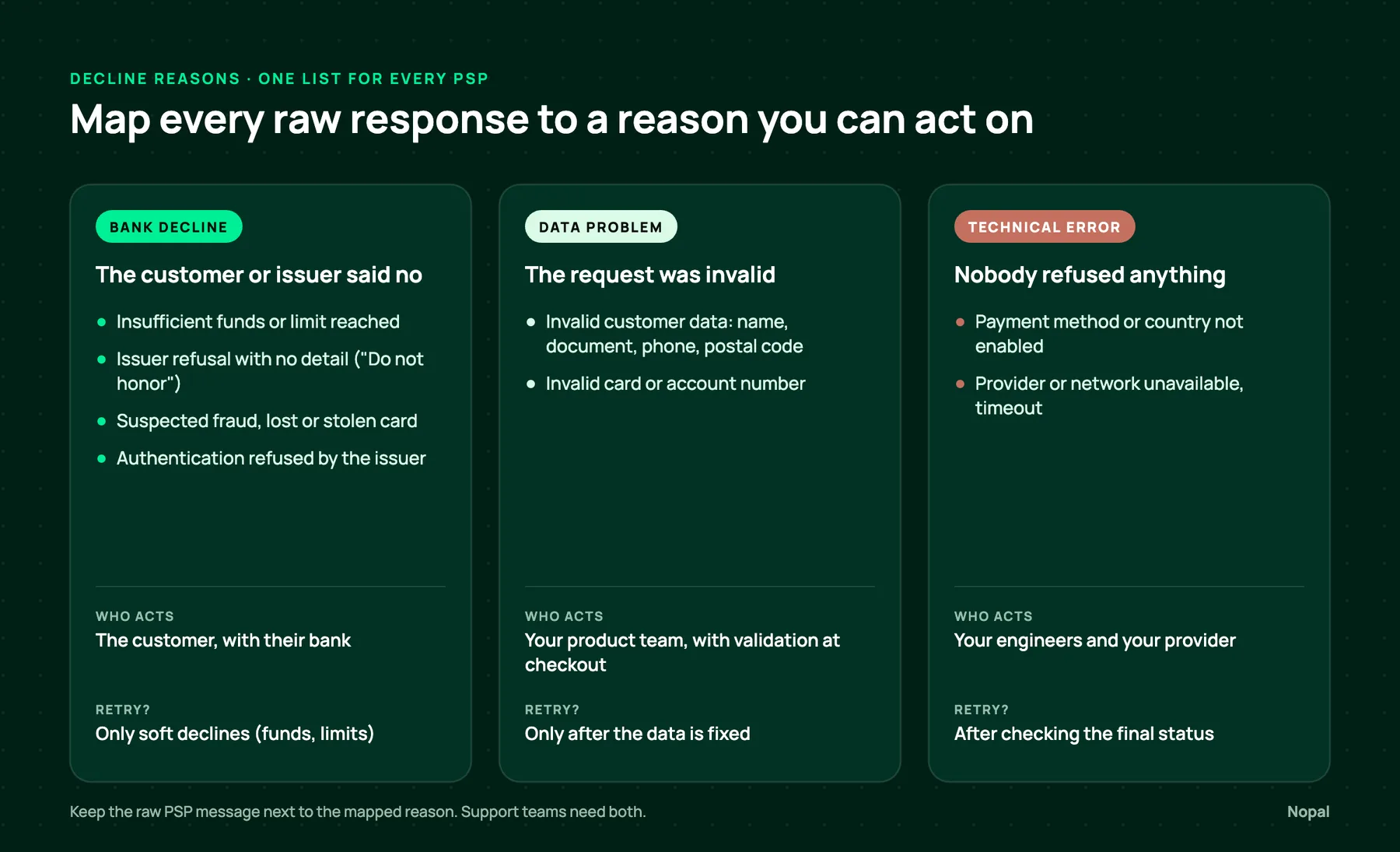
Insufficient funds or limit reached
- Group: bank decline, customer side.
- Who acts: the customer. A later retry or another method can work.
Issuer refusal with no detail ("Do not honor")
- Group: bank decline, issuer side.
- Who acts: the customer, with their bank. Offer another method instead of retrying the same card again and again.
Suspected fraud, lost or stolen card
- Group: bank decline, final.
- Who acts: nobody on your side. Do not retry.
Authentication refused by the issuer
- Group: bank decline.
- Who acts: the customer, with their bank. If the customer left the authentication page instead, it is an abandonment, not a decline.
Invalid customer data
- Group: data problem.
- Who acts: your product team, with validation at checkout.
Invalid card or account number
- Group: data problem, final for that number. Visa's rules forbid reattempting with the same account number after this decline.
- Who acts: the customer, who needs to enter a valid number.
Payment method or country not enabled
- Group: technical error.
- Who acts: your engineers, or your provider's onboarding team.
Provider or network unavailable, timeout
- Group: technical error.
- Who acts: your engineers and your provider. Check the final status before you retry, so the customer is not charged twice.
Three rules keep the mapping useful:
- Keep the raw PSP message next to the mapped reason. Support teams need both.
- Never let a configuration error show up as a customer decline.
- Review unmapped responses every week. New strings appear when you add a provider or when a provider changes its messages.
What about bank transfers, Pix and cash vouchers?
Local methods rarely return a classic decline. They fail in other ways:
- The customer never pays the reference, and it expires. That is an expiry, not a decline. We cover expiry rules by method in Pending payments in LATAM.
- The money arrives but cannot be matched to the order: wrong amount, wrong reference, reused account number.
- The request is rejected before the customer sees it, often because of a missing or invalid document number, such as the payer's CPF in Brazil.
- The customer cancels at their bank, for example during a PSE payment in Colombia.
Give each of these its own reason ("expired", "unmatched", "rejected request", "cancelled by customer") and keep them apart from card declines.
What should you store with every declined payment?
- The raw code and the raw message, exactly as the PSP sent them.
- The PSP, the payment method and the country.
- The mapped reason and its group.
- A timeline: created, sent to the PSP, PSP response, final status.
- The merchant order ID, so retries on the same order can be linked.
With these fields, someone on your support team can answer "why was this payment refused?" without opening a ticket with the PSP.
What should the customer see after a decline?
The customer does not need the raw code. They need to know what to do next.
- For a bank decline, suggest another payment method, or contacting their bank.
- For a data problem, point to the field to fix and keep the rest of the form filled in.
- For a technical error, say the problem is on your side and ask them to try again shortly.
- For suspected fraud, show a generic message. Explaining the reason helps the wrong people.
How can you check your own declines this week?
Export your last few hundred declined transactions. Group them by reason, and sort each reason into the three groups above. It does not need to be perfect.
Example: out of 400 declines, 180 are bank declines, 140 are data problems and 80 are technical errors. Bank declines are under half. Your quickest win is the checkout form and the integration, and it probably has nothing to do with which PSP you use.
Frequently asked questions
- What does "Do not honor" mean?
- The issuer refused the payment without giving a specific reason. It is a generic decline, often tied to the issuer's risk rules. The customer usually has to contact their bank or pay with another method.
- What is the difference between a declined payment and a failed payment?
- A declined payment was reviewed by the issuer, the bank or the PSP's risk engine, and refused. A failed payment never got a decision: a timeout, an invalid request or a configuration error. Only declines belong in the approval rate.
- Should you retry a declined payment?
- Only some of them. Soft declines, like insufficient funds or a temporary issuer problem, can succeed later. Hard declines, like a stolen card or a closed account, will not. Card networks limit reattempts, so retry based on the decline code, not on a fixed schedule.
- Why do PSPs return different codes for the same reason?
- Each PSP maps issuer responses, its own risk decisions and its technical errors to its own format, sometimes in the local language. Unless you map them to one list of reasons, the same cause shows up under several labels.
- Can bad customer data cause a decline?
- Yes. An invalid name format, a short postal code or a phone number without the country code can get a payment rejected before it reaches the bank. Validating these fields at checkout is usually the cheapest way to raise approvals.